Sony FX3, FX30 and FX2 timecode from a DJI Mic 3 or Rode Wireless PRO: what locks and what doesn't
Only some Sony bodies take external timecode. How to feed it from a DJI Mic 3 or Rode Wireless PRO, the 50p catch, and when audio timecode is the safer route.
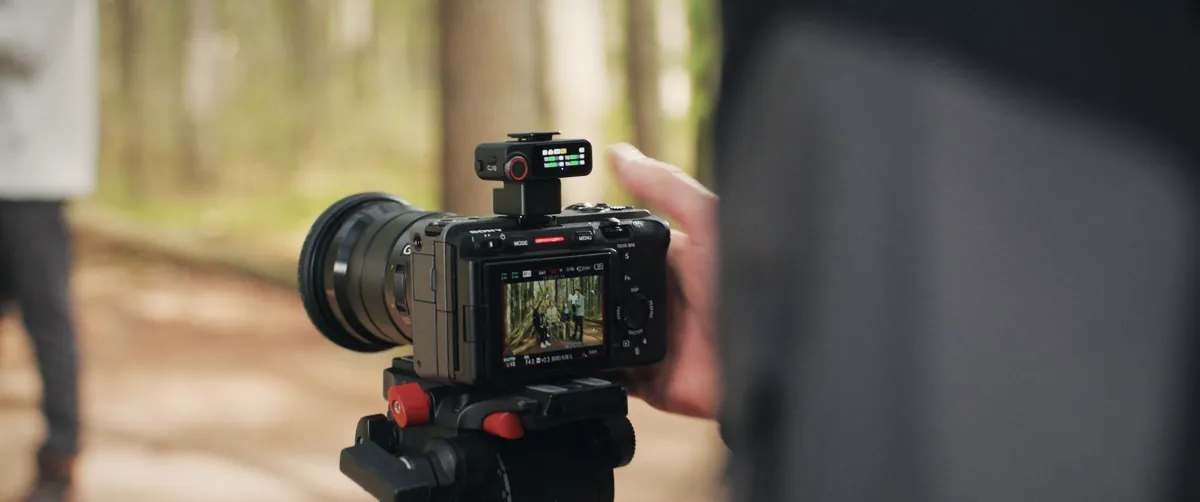
A DJI Mic 3 receiver on a Sony FX-series body. Image: DJI, graded by 4FILMMAKERS.
Sony's help guides describe external timecode lock on the FX3 (system software 2.0 or later), FX3A, FX30, FX2, A7S III, A1, A1 II and A9 III, all through the VMC-BNCM1 adapter on the Multi/Micro USB port. The FX5 takes timecode on USB-C with its own cable, the VMC-BNCU1. Rode publishes a step-by-step setup for the Wireless PRO into an FX3 or FX30. DJI documents the Mic 3's timecode output only with its own Osmo cameras, so a Mic 3 locking an FX3 over BNC should work on paper, but we couldn't find a published test.
The A7 IV, A7 V and A7R V aren't on that list, and Sony doesn't cover them in its documentation for the cable. You can still sync those bodies with audio timecode: the receiver puts the timecode signal on one channel of the camera's mic input and Resolve reads it later. That costs you one audio channel and ties the sync step to Resolve.
Which Sony cameras accept timecode in?
Sony's "Matching the time code with other devices" page appears in the help guide for each of these bodies. The procedure is the same on all of them: TC/UB menu, Time Code Make on Preset, Time Code Run on Free Run, then plug in the cable.
External timecode lock on Sony bodies, from Sony's help guides
Camera
Port
Cable
Note from Sony
FX3
Multi/Micro USB
VMC-BNCM1
Help guide for system software 2.0 or later. Won't work through the XLR handle's Micro USB
FX3A
Multi/Micro USB
VMC-BNCM1
Same XLR handle limit
FX30
Multi/Micro USB
VMC-BNCM1
Same XLR handle limit
FX2
Multi/Micro USB
VMC-BNCM1
Same XLR handle limit
A7S III
Multi/Micro USB
VMC-BNCM1
Help guide for Ver. 3 or later
A1
Multi/Micro USB
VMC-BNCM1
Help guide for Ver. 2 or later
A1 II, A9 III
Multi/Micro USB
VMC-BNCM1
Standard procedure
FX5
USB-C (USB PORT 2)
VMC-BNCU1
Enable timecode on port 2 in the TC/UB menu
A7 IV, A7 V, A7R V
Not listed
None listed
Use audio timecode through the mic input
Once the lock has held for about ten seconds it survives unplugging, so you can jam the camera and pull the cable. Changing Time Code Make, Time Code Run or the preset releases it, and so does switching to S&Q. Sony also warns that footage can sit one frame off the reference and that the gap can grow over a long day. The B&H listing for the VMC-BNCM1 names the FX3, FX30, FX2, A1, A1 II, A9 III and A7S III; a B&H staff answer to an A7R V owner said the cable hadn't been enabled for that body.
Metadata timecode or audio timecode?
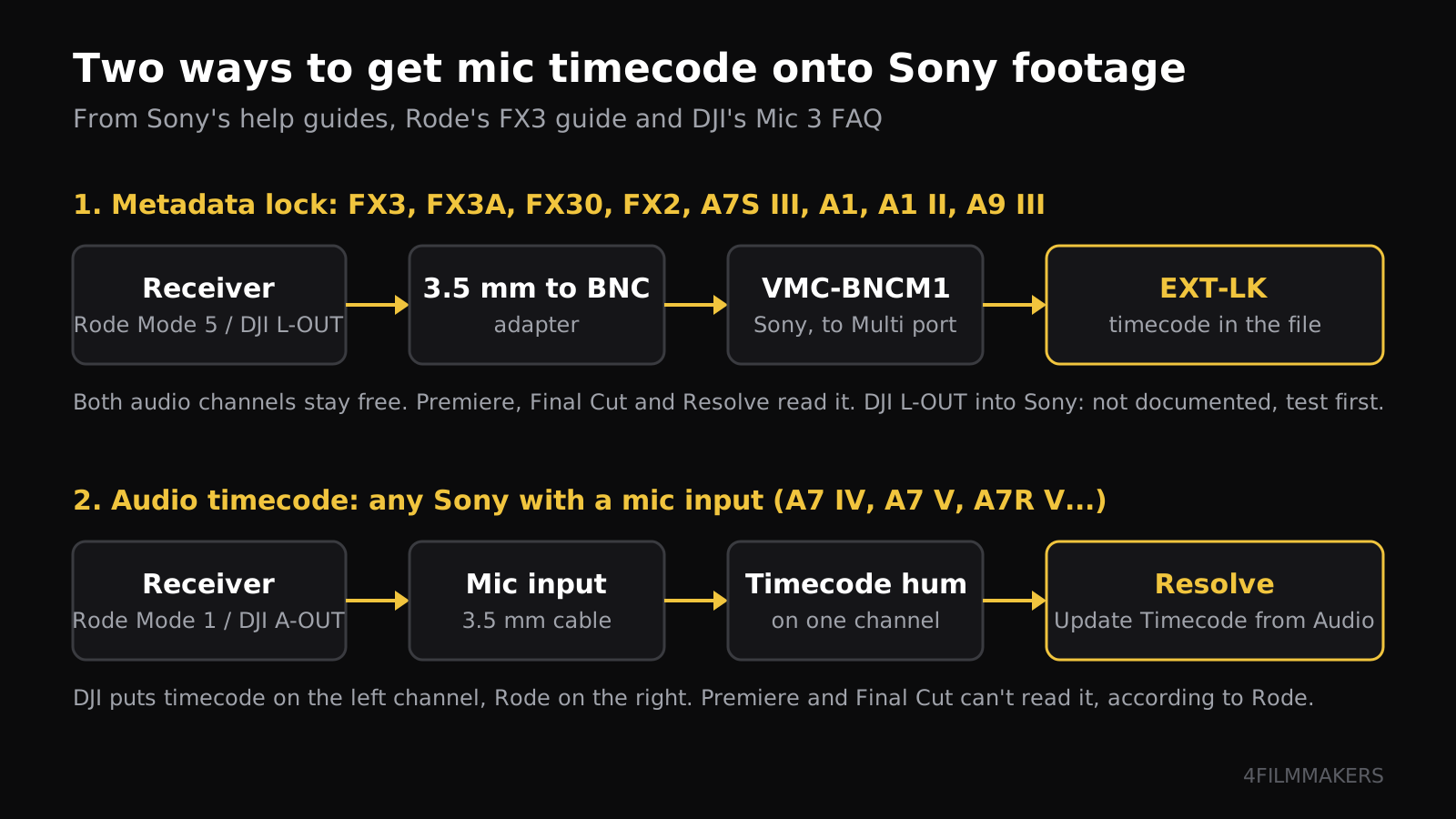
The two ways to get a wireless mic's timecode onto Sony footage
Metadata lock (LTC into the TC port)
Audio timecode (into the mic input)
Cameras
Bodies in the table above
Any Sony with a 3.5 mm mic input
Extra hardware
3.5 mm to BNC adapter plus VMC-BNCM1 (or VMC-BNCU1)
The receiver's own 3.5 mm cable
Camera display
Shows the mic's timecode, "EXT-LK"
Shows the camera's own clock
Camera audio
Both channels free for sound
One channel carries a timecode hum
Editing
Premiere, Final Cut and Resolve sync by timecode
Resolve converts it; Premiere and Final Cut can't, per Rode
Cable on the body
A second cable hanging off the Multi port during the jam
Only the mic cable
If your camera supports the lock, use it: you keep both audio channels and you can sync in Premiere or Final Cut as well as Resolve. Audio timecode is the fallback for bodies without a port, or for the day you leave the BNC adapter at home.
Route 1 needs a body with a timecode input. Route 2 works on any Sony with a mic jack. Graphic: 4FILMMAKERS.
How do you lock an FX3 to a Rode Wireless PRO?
Rode's guide for the FX3 and FX30 runs like this. In RØDE Central, turn timecode on, pick the frame rate and select Timecode Mode 5, which sends only timecode on both channels of the 3.5 mm and USB outputs. Set the receiver's output gain to 0 dB, because Rode says some cameras only detect a loud signal. Put the camera on the same frame rate, set TC/UB to Preset and Free Run, then connect the receiver through a 3.5 mm to BNC adapter and the VMC-BNCM1. The camera's counter jumps to the Wireless PRO's time.
Mode 5 sends a loud SMPTE signal, and Rode warns you not to put headphones on that output. The transmitters keep free-running if the receiver drops out, and resync when they find it again. For a multi-camera day, Rode suggests jamming each camera about every four hours, or after every power cycle.
Can a DJI Mic 3 do the same?
The Mic 3 receiver has the right outputs. DJI's spec sheet lists LTC output on the 3.5 mm TRS and USB-C ports, and LTC input up to +6 dBu on the host receiver. The FAQ explains the receiver's port modes: L-OUT for LTC, A-OUT for audio timecode, L-IN to take timecode from another generator. The only camera setup DJI walks through is L-OUT into an Osmo Pocket 3 or Osmo Action 5 Pro over the USB-C phone adapter.
Timecode on the two receivers, from DJI's and Rode's own pages
DJI Mic 3
Rode Wireless PRO
Frame rates
23.98, 24, 25, 29.97, 29.97 DF, 30, 50, 60
23.98, 24, 25, 29.97, 29.97 DF, 30
LTC for a camera's TC port
L-OUT mode, 0.5 Vp-p
Mode 5, "very loud" SMPTE signal
Audio timecode
A-OUT, timecode on the left channel
Mode 1, timecode on the right, both mics summed on the left
Timecode in
L-IN on the host receiver only
Receiver acts as the source
Drift
0.5 ppm, under 1 frame in 24 hours (DJI lab figure)
No ppm figure; Rode suggests re-jamming every 4 hours
Sony walkthrough from the maker
None
FX3, FX30, A7S III
Kit price, Europe
€259 (2 TX, 1 RX, case), DJI store, 4 Nov 2026
About €289 to €300 at retailers
On paper, Mic 3 L-OUT into a 3.5 mm to BNC adapter and the VMC-BNCM1 is the same chain Rode uses. The open question is level. DJI's output is 0.5 Vp-p, Sony's help guides don't state what the Multi port needs, and Rode had to tell its users to push gain because some cameras ignore a quiet signal. We couldn't find a user report either way. If you own both, test the jam at home and look for "EXT-LK" before you build a shoot around it.
Don't count on the DJI Mic Series Camera Adapter for timecode either. DJI says it carries 48 kHz/24-bit digital audio into Sony's MI shoe and powers the receiver; the FAQ says nothing about timecode through the shoe. The adapter adds €29 to the kit price in DJI's EU store.
Does it lock if you shoot 50p?
Nobody has documented it. Sony says the reference timecode's frequency has to match the camera's frame frequency, or the camera can't lock and won't behave normally. Rode's list stops at 30 fps and tells you to pick the rate that divides into your project rate, which means 25 for 50p. Neither Sony nor Rode says whether an FX3 at 50p accepts a 25 fps reference. The Mic 3 offers 50F and 60F directly, so on paper it avoids the question. If you deliver at 50p, run the test with the exact settings you'll use on the job.
How do you sync audio timecode in the edit?
Feed the receiver into the mic input with A-OUT (DJI) or Mode 1 (Rode). DJI's FAQ says the steady hum on the left channel is the timecode. Rode puts it on the right and sums both transmitters on the left, so check which side you're monitoring. Your clean sound comes from the transmitters' internal recordings anyway, 32-bit float on both systems, with timecode written into the files.
In Resolve, select the clips in the Media Pool, right-click and choose Update Timecode from Audio Track, then line them up with Auto Align Clips based on timecode. Rode's guide says Premiere and Final Cut can't turn audio timecode into clip timecode, so Rode itself suggests syncing in Resolve and moving the timeline across.
What does each setup cost?
Prices from the shops in Sources (DJI store checked 4 November 2026); the Sony cable varies a lot by country
Item
Europe
UK
US
DJI Mic 3, 1 TX + 1 RX
€169 (DJI store)
No DJI UK price shown
Not checked
DJI Mic 3, 2 TX + 1 RX + case
€259 (DJI store), €288 with camera adapter
£259 at launch, £215 at John Lewis
Not checked
Rode Wireless PRO
€289 (Musikhaus Korn), €299.95 (Materiel.net)
£221 to £329 at retailers
$299 after Rode's 2025 price cut
Sony VMC-BNCM1
€136.49 (aio.lv)
£58 (ProAV)
$169.95 at launch
Sony VMC-BNCU1 (FX5)
No EU price found
Not checked
$99.99 (Adorama pre-order)
Which setup fits your shoot?
Our pick by situation
You have
Do this
Watch out for
FX3, FX30 or FX2 and a Wireless PRO
Mode 5 into VMC-BNCM1, metadata lock
Output gain at 0 dB; re-jam every 4 hours
FX3, FX30 or FX2 and a Mic 3
Try L-OUT into VMC-BNCM1
Undocumented by DJI; keep A-OUT as the backup
A7 IV, A7 V or A7R V
Audio timecode (A-OUT or Mode 1)
Lose one camera channel; sync in Resolve
FX5
VMC-BNCU1 on USB PORT 2
Check stock: Adorama listed it as a pre-order
Main frame rate 50p
Mic 3 at 50F, or test the Wireless PRO at 25
Sony needs matching frequencies
Two cameras plus the mics
Jam both bodies from the receiver
Same frame rate on everything; S&Q breaks the lock
Pros and cons
DJI Mic 3 against Rode Wireless PRO for timecode on Sony
Pros
Cons
DJI Mic 3
50 and 60 fps timecode, published drift figure, cheaper kit, timecode input for a set with a master clock
No Sony walkthrough, LTC level untested on Sony's Multi port, camera adapter doesn't mention timecode
Rode Wireless PRO
Documented FX3, FX30 and A7S III setups, loud Mode 5 signal made for camera TC inputs
Tops out at 30 fps, Mode 1 puts both mics on one channel
Our view: if you own an FX3 or FX30 and want timecode now with the least guesswork, the Wireless PRO is the documented route. If you already have a Mic 3, buy the VMC-BNCM1 from a shop that takes returns, test L-OUT at home, and fall back to A-OUT and Resolve if the camera won't lock. For the Mic 3's recording formats and what reaches the camera, see our DJI Mic 3 32-bit float guide. FX5 owners waiting on stock can check our FX5 shipping update, and A6700 or ZV-E10 II users running a second camera from a tablet will find the app details in our Monitor & Control guide.
Questions people ask
Does the Sony FX3 have a timecode input?
Yes, from system software 2.0. Timecode goes in through the Multi/Micro USB port on the body with Sony's VMC-BNCM1 adapter cable and a BNC cable. It doesn't work through the Micro USB port on the XLR handle.
Can the DJI Mic 3 send timecode to a Sony camera?
The receiver outputs LTC (L-OUT) and audio timecode (A-OUT). Audio timecode works through any Sony mic input. DJI doesn't document L-OUT into a Sony timecode port, so test it with the VMC-BNCM1 before a job.
Does the Sony A7 IV or A7 V accept external timecode?
Sony documents external timecode lock on the FX3, FX3A, FX30, FX2, FX5, A7S III, A1, A1 II and A9 III. For other bodies, record audio timecode on one channel of the mic input and sync in DaVinci Resolve.
Can Premiere Pro or Final Cut read audio timecode?
Rode says neither can convert audio timecode into clip timecode. DaVinci Resolve can, with Update Timecode from Audio Track in the Media Pool. You can sync in Resolve and send the timeline to Premiere or Final Cut.
Which frame rates does the Rode Wireless PRO timecode support?
23.98, 24, 25, 29.97 drop frame, 29.97 and 30 fps. For higher rates Rode says to choose one that divides into the project rate, such as 25 for 50p. The DJI Mic 3 also offers 50 and 60 fps.