How to grade Osmo Pocket 4P D-Log 2 in DaVinci Resolve: free vs Studio, LUT vs ACES
Resolve's Color Space Transform still has no D-Log 2 entry. What DJI's LUTs do to your highlights, the missing DCTL, and a node order that works in free.
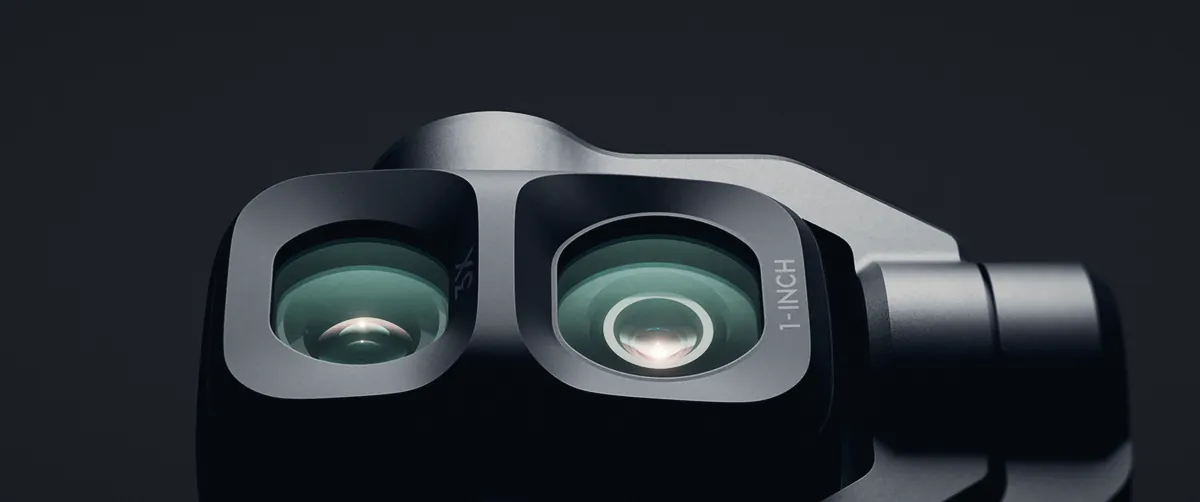
Two cameras, two curves: the 1-inch wide camera (right) records D-Log 2, the 3x tele (left) records D-Log. Image: DJI, graded by 4FILMMAKERS.
DaVinci Resolve still has no D-Log 2 option in its Color Space Transform, so on the Osmo Pocket 4P's wide camera you have two real choices today: DJI's free D-Log 2 LUT, placed after your exposure and highlight fixes, or a colour-managed ACES grade that only works in Resolve Studio. DJI's ACES guide for D-Log 2 tells you to load a file called Dlog2_DGamut2_to_ACES_AP0_cat02.dctl, but the only DCTL DJI ships is the 2023 one for plain D-Log. That one fits the 60mm camera, not the wide.
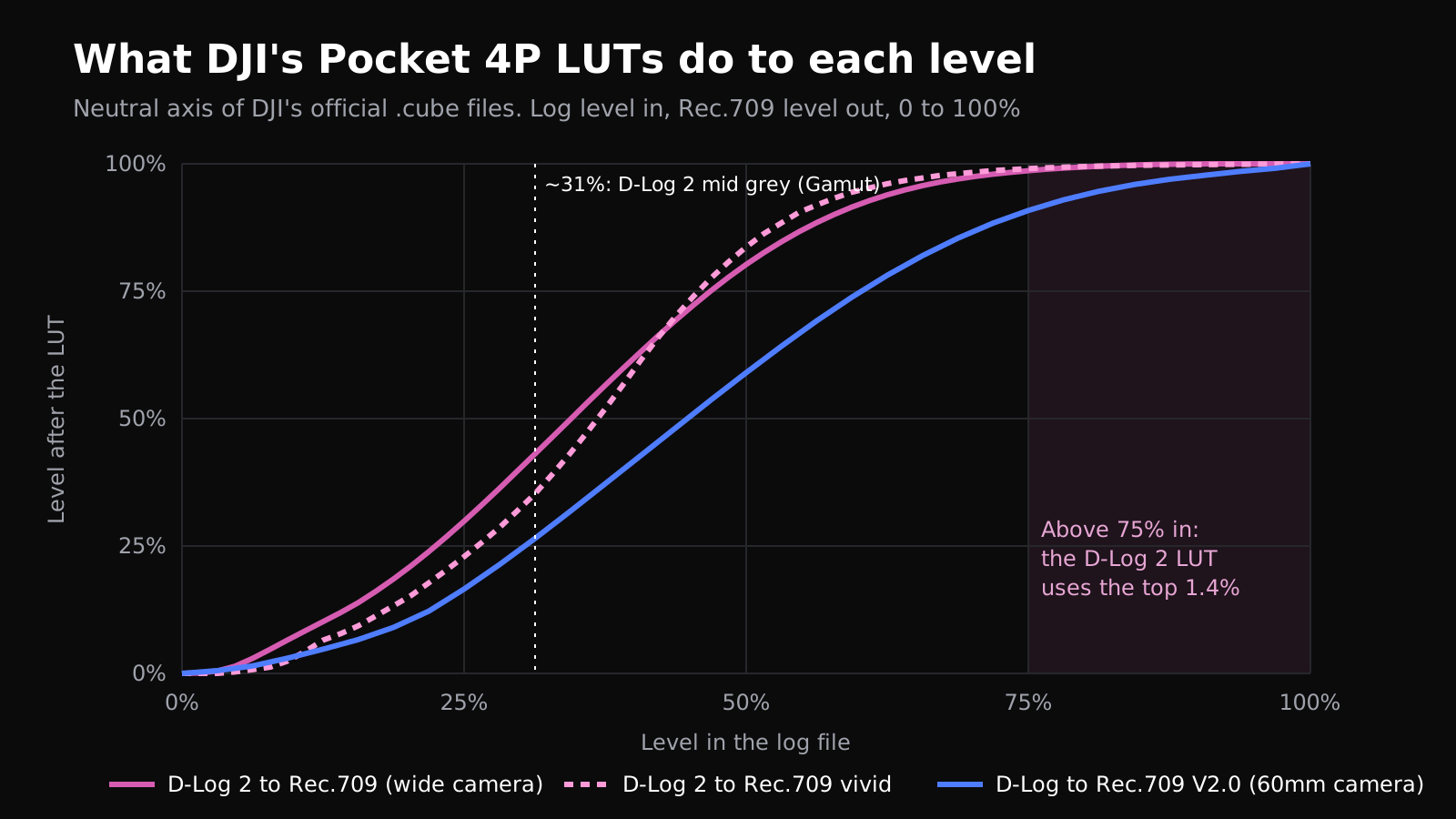
We downloaded every colour file DJI lists for the Pocket 4P on 8 November and read the LUTs value by value. The D-Log 2 LUT squeezes the top quarter of the log signal into the last 1.4% of the output, which is why skies look stuck once the LUT goes on. The node order below gets around that, and it works in the free version.
What DJI gives you for D-Log 2, file by file
We opened each file on the Pocket 4P download page. The LUTs are all there; the ACES guide's key file isn't.
DJI colour files for the Osmo Pocket 4P, checked 8 November 2026
File
Camera
What we found
D-Log2 to Rec.709, V1.0, 33 and 65 point
20mm wide
The standard conversion. Mid grey (about 31%) lands at 43%
D-Log2 to Rec.709 vivid, V1.0, 33 and 65 point
20mm wide
More contrast: the same grey lands at 35%, highlights roll off sooner
D-Log to Rec.709 and vivid, V2.0, 33 point
60mm tele, D-Log slow motion
Released with the September firmware, softer highlight roll-off than V1.0
D-Log to Rec.709 and vivid, V1.0, 33 point
60mm tele
Still listed. Projects graded with it will change if you swap to V2.0
D-Log2 Recommended ACES Workflow (PDF, 3 pages)
20mm wide
Names Dlog2_DGamut2_to_ACES_AP0_cat02.dctl. The file isn't attached or linked
D-Log Recommended ACES Workflow (PDF)
60mm tele
Same steps with the D-Log DCTL
ACES Workflow Guide (zip, DJI software downloads)
D-Log cameras
DLog_DGamut_to_ACES_AP0_cat02_v1 as .dctl, .ctl and .clf, dated 2023. No D-Log 2 file
D-Log D-Gamut white paper
D-Log cameras
The 2017 document. DJI hasn't published a D-Log 2 version
Both ACES PDFs carry a creation date of 20 May 2026 in their file data, so DJI wrote the D-Log 2 guide around launch. Six months on, the DCTL it depends on is still missing. Third-party sites repeat the file name, but we found no official link, and we wouldn't install a colour transform from an unofficial mirror. If you need it, ask DJI support.
Why does the DJI LUT flatten your highlights?
A .cube file is a table: log level in, Rec.709 level out. Reading the neutral axis of DJI's files shows where each one spends its output range.
Values read from DJI's .cube files. In Resolve, a normal video-levels clip's 0 to 100% roughly matches 0 to 100 IRE. Graphic: 4FILMMAKERS.
Neutral levels through DJI's Pocket 4P LUTs (our reading of the official files)
Level in the log file
D-Log 2 LUT
D-Log 2 vivid
D-Log V2.0 (60mm)
D-Log V1.0 (60mm)
31% (D-Log 2 mid grey, per Gamut)
43%
35%
26%
25%
50%
80%
84%
59%
59%
62.5%
94%
96%
78%
81%
75%
98.6%
99.0%
90.8%
94.6%
87.5%
99.9%
99.8%
97.0%
99.1%
Gamut, which profiles log curves for its own LUTs, puts the D-Log 2 white clip at about 94% at ISO 1600. So at the native ISO, everything from 75% to 94% in your file (bright sky, a window, the sunny side of a face) ends up between 98.6% and 100% after the DJI LUT. The detail is in the file. The LUT doesn't show it, and grading on a node after the LUT can't bring back what it has already pressed flat.
At ISO 100 Gamut puts the clip near 70%, which the LUT maps to about 97.5%. Clipped whites shot at low ISO may never reach full white after the LUT. That's our reading of DJI's file, not a measurement on footage, so check your own clips on the waveform.
The two cameras' LUTs also disagree on mid tones. Feed both the same 31% grey and the D-Log 2 LUT returns 43%, the D-Log V2.0 LUT 26%. They're different curves, which fits what Gamut found when it shot both cameras side by side and the LUTs didn't match.
The node tree for Resolve free
Put the corrections in log, where the highlight detail still has room, and the LUT last. Our order for a single Pocket 4P D-Log 2 clip:
D-Log 2 in DaVinci Resolve free: suggested node order
Node
What to do
Why there
1. Exposure
Offset to place grey near 31% on the waveform
The LUT expects D-Log 2 grey where DJI designed it
2. White balance
Offset or the white balance picker on a neutral
Colour shifts are easier to fix before the LUT bends them
3. Highlights
Qualifier on luma above about 70%, lower Gain, or a soft roll-off curve
Pulls sky and windows below 75% so the LUT doesn't flatten them
4. Shadows (optional)
Lift or noise reduction on the dark end
Same logic, at the bottom of the curve
5. DJI LUT
D-Log2 to Rec.709, 65 point
Converts to Rec.709 for delivery
6. Look
Small saturation and contrast moves only
Anything big here clips against the LUT's ceiling
Pick the 65-point file over the 33-point one: Resolve interpolates less between the points, which helps on skies and skin gradients. Use the vivid LUT only if you like its contrast as a finished look, because it moves mid grey down by 8 points and leaves less room for later nodes. DroneXL's August guide reaches the same structure from the other side: corrections first, LUT on the last node.
The 60mm camera and slow motion record D-Log, not D-Log 2
DJI's footnotes limit 10-bit D-Log 2 to the wide camera at 1x zoom. The 60mm tele records D-Log, and the September firmware (v01.01.71.31) added "a D-Log 10-bit color mode for slow motion", which DJI tells you to pair with the v2.0 D-Log LUTs. On a busy timeline you can end up with three kinds of clip from one camera: D-Log 2, D-Log and Normal.
D-Log is the easy one. Resolve's Color Space Transform has had DJI D-Log and DJI D-Gamut for years, and the effect works in the free version. DroneXL's settings are a sensible start: input DJI D-Gamut and DJI D-Log, output DaVinci Wide Gamut and DaVinci Intermediate, grade, then a second CST to Rec.709. If you cut tele and wide together, shoot a grey card or colour chart on both cameras at the start of the day and match by eye on that frame. Two LUTs built on different curves won't do it for you.
One catch with the LUT update: footage you graded with the D-Log V1.0 LUT will look different under V2.0. At 75% input, V2.0 gives 90.8% against 94.6% for V1.0, so bright areas come out a little darker. Keep V1.0 in your LUT folder for older projects.
What Resolve Studio adds
The DCTL effect is where free and Studio split. Blackmagic's Resolve 21.1 reference manual marks the DCTL ResolveFX as Studio only, according to DaVinci Resolve Club and The Post Flow. Studio costs $295 in the US. In our DaVinci Resolve 21.2 article we noted Blackmagic's 20% sale, which runs until 20 November.
With Studio, DJI's ACES route works today for the 60mm camera: copy DLog_DGamut_to_ACES_AP0_cat02_v1.dctl into a DCTL folder inside Resolve's LUT folder, restart, put the DCTL effect on node 1, then an ACES Transform (ACES 1.3, no input transform, output ACEScct CSC) on node 2, grade, and finish with an ACES Transform from ACEScct CSC to Rec.709. For the wide camera the steps are identical, but you need the D-Log 2 file, and DJI hasn't published it. Don't run the D-Log DCTL on D-Log 2 clips to fill the gap. The curves differ, as the table above shows.
Studio also brings the noise reduction tools, which matter more on a Pocket than on a big camera. If you shoot D-Log 2 at ISO 1600 for the full range, as in our Pocket 4P ND filter guide, the extra stops come with more noise in the shadows.
Which route fits you?
Grading the Pocket 4P in Resolve: our pick by setup
You have
Wide camera, D-Log 2
60mm camera or slow motion, D-Log
Resolve free, quick social edits
DJI LUT on the last node, highlights fixed before it
DJI D-Log V2.0 LUT
Resolve free, mixed cameras on one timeline
DJI LUT, matched by eye to a chart shot
CST DJI D-Log/D-Gamut to DaVinci Wide Gamut
Resolve Studio
DJI LUT until DJI releases the D-Log 2 DCTL
DJI's 2023 ACES DCTL, or the CST
Paid LUT packs (Gamut and others)
Measured D-Log 2 to DaVinci Wide Gamut transforms
Same, with matching between cameras
Pros and cons of each D-Log 2 route
Route
Pros
Cons
DJI LUT, free Resolve
Free, official, 65-point version
Fixed look, top quarter of the signal squeezed into 1.4%
DJI ACES with DCTL, Studio
Colour-managed, DJI's own maths
D-Log 2 file not published, needs a paid licence
Third-party transforms
Into DaVinci Wide Gamut, built for matching cameras
Paid, not DJI's official maths
Our view: for most Pocket 4P owners the free LUT route is fine, as long as you do the heavy work on the nodes before the LUT. The day DJI posts the D-Log 2 DCTL, or Blackmagic adds D-Log 2 to the Color Space Transform, Studio users get a proper colour-managed path and free users should get a CST entry. We'll update this guide when either happens. Which profile to pick on each DJI camera is in our D-Log vs D-Log M vs D-Log 2 vs HLG guide.
Questions people ask
Is there a D-Log 2 Color Space Transform in DaVinci Resolve?
No. Resolve's Color Space Transform lists DJI D-Log and DJI D-Gamut, and nothing for D-Log 2 or D-Gamut2. The 21.2 release notes of 5 November don't add it either.
Does the free version of DaVinci Resolve run DCTL files?
No. The DCTL ResolveFX is a Studio feature according to the Resolve 21.1 manual, as quoted by DaVinci Resolve Club. DJI's ACES workflow depends on it, so free users should stick with the DJI LUT or the Color Space Transform.
Can I use DJI's D-Log DCTL on D-Log 2 footage?
No. The 2023 DCTL converts D-Log and D-Gamut. D-Log 2 is a different curve: DJI's own LUTs send the same 31% grey to 43% for D-Log 2 and 26% for D-Log.
Should I use the 33-point or the 65-point LUT?
The 65-point one in Resolve. It holds more points, so Resolve has less to interpolate between. Keep the 33-point file for monitors and apps that only take 33-point LUTs.
Normal or vivid D-Log 2 LUT?
Normal if you plan to grade. Vivid puts mid grey at 35% instead of 43% and rolls highlights off sooner, so it works better as a quick finished look.