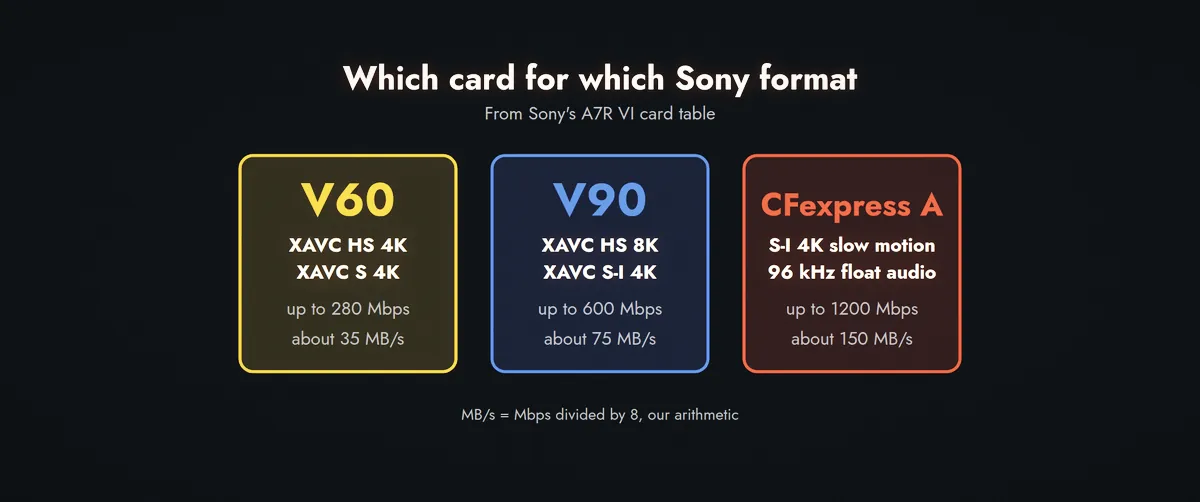
For Sony's A7R VI, a V60 SD card is enough for XAVC HS 4K and XAVC S 4K at up to 280 Mbps. You need a V90 for 8K and for all-intra XAVC S-I at up to 600 Mbps. And a CFexpress Type A card is the only option for 4K slow motion in S-I, for S-I with a proxy file, and for S-I with 96 kHz or 32-bit float audio. That's from Sony's own help guide, and it's the table most "which SD card" articles skip.
Which card does each Sony format need?
Sony publishes the answer on its help guide page "Memory cards that can be used". We read the one for the ILCE-7RM6 (A7R VI) and rebuilt the part that matters for video. Bitrates and card requirements are Sony's. The MB/s column is our division by 8.
Sony A7R VI, movie recording with Proxy Recording off
Format
Max bitrate
About
Card Sony lists
XAVC S HD
100 Mbps
12.5 MB/s
SD U3 or higher, or CFexpress A
XAVC HS 4K
280 Mbps
35 MB/s
SDXC V60 or higher, or CFexpress A
XAVC S 4K
280 Mbps
35 MB/s
SDXC V60 or higher, or CFexpress A
XAVC S-I HD
222 Mbps
28 MB/s
SDXC V90 or higher, or CFexpress A
XAVC HS 8K
520 Mbps
65 MB/s
SDXC V90 or higher, or CFexpress A
XAVC S-I 4K
600 Mbps
75 MB/s
SDXC V90 or higher, or CFexpress A (see below)
The pattern follows the maths, with a margin. 280 Mbps is 35 MB/s, so a V30 would be too slow and a V60 has room. 520 and 600 Mbps are 65 and 75 MB/s, which is why they ask for V90. CFexpress Type A has to be VPG200 or higher, and the guide says CFexpress Type B cards don't fit this camera at all.
What changes in slow motion or with a proxy file?
A lot. Slow motion and proxies are where cards that looked fine start to fail.
Sony A7R VI, the cases that push you up a card class
Mode
Format
Max bitrate
Card Sony lists
S&Q Motion
XAVC HS 4K
500 Mbps
V90 or CFexpress A
S&Q Motion
XAVC S HD
250 Mbps
V90 or CFexpress A
S&Q Motion
XAVC S-I 4K
1200 Mbps
CFexpress A only
Proxy on
XAVC S-I 4K
600 + 16 Mbps
CFexpress A only
Proxy on
XAVC S-I HD
222 + 16 Mbps
CFexpress A only
Proxy on
XAVC HS 4K
200 + 16 Mbps
V60 or CFexpress A
Look at the 250 Mbps XAVC S HD row. That's about 31 MB/s, which a V60 could handle on paper, and Sony still asks for V90. So the rule isn't only bitrate divided by 8. Sony builds in headroom for high frame rate recording, and the guide itself warns that in slow motion the recording bitrate is higher than usual.
The proxy rows are the ones people get caught by. The same S-I format that runs on a V90 on its own becomes CFexpress only the moment you turn on a proxy file.
Why does 32-bit float audio change the card?
This is the footnote on the XAVC S-I 4K row, and it's easy to miss. Sony says a CFexpress Type A card (VPG200 or higher) is required for S-I 4K when you record 96 kHz 32-bit float in 4 or 2 channels, 96 kHz 24-bit in 4 channels, or 48 kHz 32-bit float in 4 channels. It's also required if you record a 32-bit float WAV file alongside the movie.
Nextorage's NX-F2AE series is the reason this came up now. It's a UHS-II SDXC card sold in 256 GB, 512 GB and 1 TB versions, aimed at 4K, 6K, 8K and high frame rate video. Photo Rumors published the press details on 5 November, and PetaPixel covered the 1 TB card two days before.
Nextorage NX-F2AE, from Nextorage's own product text
Item
Detail
Sizes
256 GB, 512 GB, 1 TB
Video Speed Class
V90, minimum sustained write 90 MB/s
Max read and write
300 MB/s, under Nextorage test conditions
Memory
3D TLC NAND
Operating temperature
-25 to 85 °C
Warranty
5 years
Prices reported in the US
$299.99, $529.99, $999.99 (we couldn't confirm on the page)
Euro and pound prices
Not found
The 300 MB/s headline is a maximum, and it's the sustained figure that matters when you roll for 20 minutes. Nextorage's text names the 90 MB/s minimum and doesn't list any heat or sustained-speed test beyond that. It also doesn't name any camera it was tested in.
Our A7S IV rumor piece is relevant if you're waiting for a new body, because the card you buy now has to match whatever that camera asks for.
How much recording time do you get?
Our arithmetic, for the video stream only. Audio, metadata and the file system take a bit more, and cards show less than the printed capacity, so real times are a little shorter.
Approximate recording time at a constant maximum bitrate
Format and bitrate
Per hour
256 GB
1 TB
XAVC HS or S 4K, 280 Mbps
126 GB
about 2 h
about 7.9 h
XAVC HS 8K, 520 Mbps
234 GB
about 1.1 h
about 4.3 h
XAVC S-I 4K, 600 Mbps
270 GB
about 57 min
about 3.7 h
XAVC S-I 4K slow motion, 1200 Mbps
540 GB
about 28 min
about 1.8 h
This is the part that changes the purchase. If you shoot S-I at 600 Mbps, a 256 GB card is under an hour of footage. A 1 TB card is a day of interviews. If you shoot 280 Mbps HS, you may prefer two 512 GB V60 cards over one expensive V90.
Which card should you buy?
Our reading of Sony's A7R VI table. Check your own camera's guide first
If you shoot...
Card
Why
4K XAVC HS or S, proxies off
V60
Sony lists V60 for 280 Mbps. A V90 costs more for no gain here.
8K XAVC HS
V90
520 Mbps is the reason the V90 class exists.
S-I 4K or S-I HD, normal audio
V90 is enough
The 1 TB size makes sense for long takes.
S-I with a proxy file
CFexpress A
The V90 isn't listed once proxies are on.
S-I 4K with 96 kHz or float audio
CFexpress A
Sony requires it in its footnote.
4K S-I slow motion
CFexpress A
1200 Mbps is beyond what V90 guarantees.
One more opinion that isn't in Sony's table. Buying a V90 "to be safe" is reasonable when the price gap is small, and it isn't when you shoot only 4K at 280 Mbps. The money is better spent on a second card and a reader.
Questions people ask
Is a V90 card better than a V60 for video?
Only when the format needs it. V90 guarantees 90 MB/s against 60 MB/s, which matters for 8K and all-intra at 520 to 600 Mbps. For 4K at 280 Mbps, Sony's A7R VI table lists V60.
What does V90 mean on an SD card?
It's a Video Speed Class that guarantees a minimum sustained write speed of 90 MB/s. The maximum read and write speed printed on the card, such as 300 MB/s, is a different number.
Why does my Sony ask for CFexpress when I have a V90?
On the A7R VI, S-I 4K slow motion, S-I with proxies, and S-I with 96 kHz or 32-bit float audio are listed as CFexpress Type A only. Your body may differ, so read its own "Memory cards that can be used" page.
Do other Sony cameras need the same cards as the A7R VI?
Not necessarily. We read only the A7R VI guide for this article. Older and cheaper bodies have different formats and card lists, and some have no CFexpress slot.
Sources
Sony Help Guide, ILCE-7RM6 (A7R VI), "Memory cards that can be used": formats, bitrates, card requirements and footnotes (helpguide.sony.net)